Introducing EMDR Equipment to Neurodivergent Clients: Ask, Demonstrate, Adapt

Neurodivergent clients are not a single sensory group. One person may find tactile pulses regulating and visual movement exhausting; another may prefer a lightbar and dislike anything held in the hands. Some people want a detailed explanation before trying equipment, while others understand it best through a brief demonstration.

The clinically useful starting point is therefore not โ€œWhich modality works for autism or ADHD?โ€ It is โ€œWhat helps this client understand, choose and remain able to communicate during the session?โ€

Do not turn a diagnosis into an equipment setting

Autistic people and people with ADHD may experience sensory and communication differences, but those differences vary substantially between individuals and situations. A diagnosis does not tell the practitioner whether a client will prefer visual, tactile or auditory bilateral stimulationโ€”or whether equipment is appropriate at all.

Autism CRCโ€™s review of healthcare access for autistic adults identifies sensory differences, anxiety, communication barriers and previous healthcare experiences as factors that can affect engagement. It recommends communication accommodations, greater provider knowledge and more accessible environments. These principles support an individual conversation rather than a standard โ€œneurodivergent setup.โ€

Ask about the sensory system directly

A short sensory discussion can be more useful than guessing from appearance or diagnosis. Questions might include:

  • Are moving lights, particular colours or changes in brightness tiring or uncomfortable?
  • Are headphones, alternating sounds or pressure around the ears difficult?
  • How does the client generally experience vibration, touch or holding objects?
  • Do they notice discomfort immediately, or only after it has accumulated?
  • Does competing sensory input make communication harder?
  • What helps them signal that something needs to change?

These questions should remain invitations, not a diagnostic checklist. Sensory tolerance can also change with fatigue, stress, pain, medication, environment and the demands of the target material.

Explain the equipment concretely

Abstract reassurance such as โ€œItโ€™s gentleโ€ may not provide enough information. A clearer explanation describes what the equipment will do, what the client might notice, how long a short test will last and how it will stop.

For example: โ€œThese two handheld units alternate left and right. We can begin at a low level for a few seconds while you attend to something neutral. You can ask me to stop, put them down or use the agreed signal at any time.โ€

The Australian Commission on Safety and Quality in Health Care recommends accessible, relevant information and communication tailored to a personโ€™s needs, including neurodiversity. Some clients may prefer written steps, a visual sequence, extra processing time or a demonstration without simultaneous verbal explanation.

Offer a small menu, not every option at once

Choice supports autonomy, but too many choices presented rapidly can increase cognitive load. The practitioner can describe the available modalities briefly, identify any obvious exclusions from the clientโ€™s history and test one reasonable option at a time.

A neutral demonstration helps separate the sensory experience from trauma processing. It can answer practical questions: Is the alternation perceptible? Is the visual path comfortable? Do the headphones create pressure? Does holding a tapper compete with the clientโ€™s preferred form of movement or self-regulation?

Make the stop signal accessible

A stop signal is only useful if the client can produce it reliably under load and the practitioner can recognise it. A raised hand may work well for one person and poorly for another. Alternatives may include putting down a tapper, turning a palm over, saying a specific word, pressing an agreed control where appropriate, or using another clear movement.

Do not rely exclusively on eye contact, facial expression or conventional body language to judge comfort or agreement. Research with autistic adults in healthcare settings has found that clinicians may misread nonverbal communication when they apply neurotypical expectations. Confirm experience directly and give the client time to answer.
Stillness is not necessarily comfort

A client who becomes quiet, still or compliant may be concentrating, processing language, masking discomfort, freezing or simply preferring not to speak. The practitioner should not treat the absence of objection as proof that the setting is comfortable or that consent remains unchanged.

Useful check-ins can be specific and low-demand: โ€œIs the light comfortable, uncomfortable or hard to tell?โ€ โ€œWould you like the tap to stay the same, become gentler or stop?โ€ Where verbal responding itself adds load, agree beforehand on simple alternatives.

Consider the whole sensory environment

The equipment is only one part of the room. Fluorescent lighting, background conversation, air-conditioning noise, chair texture, fragrance, visual clutter and the pressure of headphones can combine. A tolerable modality in a quiet demonstration may feel different once target work and other sensory demands are added.

Reasonable environmental adjustments might include reducing unnecessary lighting, closing a door, removing background audio, changing chair position or allowing a familiar self-regulation strategy that does not interfere with the clinical task. The aim is not a universally โ€œsensory-freeโ€ room, but a workable environment for this person.

Preserve the protocol while adapting access

EMDR-specific research involving autistic and ADHD clients is growing but remains limited. EMDRIA practitioner material recommends a neurodiversity-affirming approach in which clinicians retain the overall EMDR framework while making accommodations for communication, sensory processing and access as needed.

Equipment adaptation should not become improvised treatment outside the practitionerโ€™s training. Changes to explanation, pacing, modality, room setup and response format can support access; decisions about readiness, targeting, reprocessing and closure remain clinical decisions requiring appropriate training, assessment and consultation.

A practical introduction sequence

  1. Ask about preferences. Explore communication and sensory needs without assuming them from diagnosis.
  2. Explain concretely. Describe what the modality does, what the client controls and how it stops.
  3. Choose one option. Avoid presenting every setting and modality simultaneously.
  4. Demonstrate with neutral attention. Keep the first test brief and separate from target processing.
  5. Confirm an accessible stop signal. Practise it and show that it produces an immediate stop.
  6. Invite specific feedback. Offer clear choices without forcing a rapid verbal explanation.
  7. Recheck during the session. Sensory capacity and communication can change under emotional load.
  8. Record useful preferences. Document accommodations that support continuity without reducing the client to a fixed sensory profile.

Individualisation is the point

A neurodiversity-affirming equipment introduction is not a special collection of settings. It is a process of asking, demonstrating, listening and adapting. The client does not need to appear comfortable in a conventional way; they need a credible way to communicate what works, what does not and when something should stop.

This article is general educational information for EMDR-trained practitioners. It is not a substitute for accredited training, supervision, individual assessment, disability-access obligations or consultation with appropriately qualified professionals.


Sources

How to Evaluate an EMDR Equipment Demonstration

An EMDR equipment demonstration can be impressive: a bright light path, responsive controls, multiple colours, strong tappers and several operating modes. But a good demonstration should answer more than โ€œWhat can it do?โ€ It should help the practitioner decide whether the system will be clear, reliable and workable in an actual treatment room.

It should not be used to imply that a device, setting or modality produces better clinical outcomes simply because the effect is more noticeable.

Begin with the treatment-room task

Before testing features, identify the practical work the equipment needs to support. Will it remain in one consulting room or travel between locations? Does the practitioner mainly need visual, tactile or auditory stimulation? Will several clinicians share it? How quickly must it be prepared between appointments?

These questions turn a feature demonstration into a workflow evaluation. A sophisticated control has limited value if it is difficult to reach, understand or adjust while maintaining attention on the client.

Time the complete setup

Ask to see the system start from packed or disconnectedโ€”not already assembled on a display table. Note the steps required to position the lightbar, connect tappers or headphones, arrange cables, access power and return the controls to a conservative starting point.

Also test packing it away. Portability is not only about weight. It includes the number of loose components, protection for the lightbar, cable organisation and whether the kit can be checked quickly before leaving a room.

Evaluate controls without looking down constantly

Operate the Start/Stop control and the main adjustments from the practitionerโ€™s likely seated position. Can the system be paused promptly? Are the controls distinguishable by position or feel? Is it easy to tell which parameter is changing without turning the clinical interaction into a technology task?

A screen can provide detailed information; physical controls can provide direct access. Neither interface is automatically better. The useful question is whether the chosen design supports dependable operation in the practitionerโ€™s own workflow.

Test modalities separately

When a system provides visual, tactile and auditory options, test each independently before trying combinations.

  • Visual: Is the full path visible? Can brightness, colour, speed and travel length be adjusted without glare or obvious stepping?
  • Tactile: Are the left and right pulses clear and consistent? Are the tappers comfortable to hold, and can the output begin at a genuinely gentle level?
  • Auditory: Is stereo separation clear through suitable headphones? Is there practical, conservative volume control?

The goal is not to find the strongest possible output. It is to establish whether the range includes subtle, usable settings and whether changes are predictable.

Change one variable at a time

A demonstration becomes difficult to interpret when speed, amplitude, travel length and modality are changed together. Adjusting one main variable at a time reveals how the control behaves and whether one parameter unintentionally affects another.

For example, Mangroveโ€™s current product guide notes that its speed interacts with lightbar travel length and tapper amplitude. That relationship is easier to understand through deliberate testing than through a rapid tour of every knob and button.

Check the interruption points

Do not assess only ideal operation. Stop a set early. Disconnect and reconnect an accessory according to the instructions. Change from one modality to another. Ask how the system indicates power and what the recommended response is if a component becomes intermittent.

The purpose is not to make equipment fail. It is to understand how calmly and quickly the practitioner can regain a known state when ordinary interruptions occur.

Distinguish comfort from clinical effectiveness

A practitioner can evaluate whether a light path is smooth, whether tappers feel comfortable and whether controls are intuitive. A short product demonstration cannot establish that one device will produce better EMDR outcomes than another.

EMDR is a structured psychotherapy, and bilateral stimulation is one component within the wider treatment model. Training, case conceptualisation, readiness, preparation, therapeutic relationship and clinical judgement are not features supplied by the equipment.

Ask about ownership after purchase

A demonstration should include the less glamorous questions: What is supplied? Which accessories cost extra? Is an app, account or subscription required? Are manuals available? Who provides support? What happens if one component fails? How long is the written warranty?

Mangrove currently states that its products carry a one-year replacement warranty and that manuals and support details are supplied after purchase. Practitioners comparing systems should request equivalent information from each supplier in writing.

In Australia, a written warranty and the automatic consumer guarantees under Australian Consumer Law are not the same thing. The ACCC explains that warranties are additional promises and do not remove applicable consumer-guarantee rights. Whether particular protections apply can depend on the circumstances of the purchase, including some business purchases.

A practical demonstration scorecard

  1. Can the full system be set up and packed away without confusion?
  2. Is the Start/Stop control immediate and easy to reach?
  3. Can the practitioner operate key controls while remaining oriented toward the client?
  4. Do all modalities begin at a conservative, comfortable level?
  5. Are left and right signals clear and consistent?
  6. Are adjustments predictable when one variable changes?
  7. Does the equipment fit the room without obstructing observation or movement?
  8. Are cables, power requirements and storage practical?
  9. Are warranty, support, repairs and replacement components clearly explained?
  10. Are product claims limited to what the demonstration can genuinely show?

A useful demonstration leaves fewer unknowns

The best demonstration is not the one with the most dramatic sensory effect. It is the one that shows the complete workflow, makes limitations visible and gives the practitioner enough information to compare systems calmly.

Test the equipment for reliability, comfort and usability. Leave claims about treatment effectiveness to appropriate clinical evidence.


This article provides general educational information for appropriately trained practitioners. It does not constitute a treatment protocol, legal advice or a clinical endorsement of any particular device.

Sources

Sharing EMDR Equipment Across a Group Practice: What to Plan

A practical framework for sharing EMDR equipment across a clinic, including responsibility, setup, cleaning, storage, faults and clinical handover.

Sharing EMDR Equipment Across a Group Practice: What to Plan

Sharing EMDR Equipment Across a Group Practice: What to Plan

When several clinicians share one EMDR system, the equipment moves from being an individual tool to a small piece of clinical infrastructure. That creates practical questions that do not arise when one practitioner controls the setup: Who checks it? Who cleans it? Where are the components stored? What happens when a cable or tapper behaves differently? And how are client preferences communicated without turning yesterdayโ€™s settings into todayโ€™s prescription?

A simple group-practice plan can reduce uncertainty while keeping the clinical decisions with each appropriately trained practitioner.

Shared equipment does not mean shared clinical responsibility

Each clinician remains responsible for determining whether EMDR is appropriate for the client, which phase of treatment they are undertaking and whether a particular form of bilateral stimulation is clinically suitable. Familiarity with the controller is not a substitute for EMDR training.

EMDRIA describes EMDR as a clinician-led psychotherapy and its approved basic-training framework includes instruction, supervised practicum and consultation. A group practice should therefore distinguish clearly between permission to access the equipment and competence to use it within EMDR treatment.

Nominate an equipment custodian

Shared responsibility can easily become unclear responsibility. Nominate a personโ€”or a clearly defined rotating roleโ€”to oversee the practical condition of the system. This is not a clinical supervisor role. It is an equipment-management function that may include:

  • keeping an inventory of the controller, power supply, lightbar, tripod, tappers, headphones and cables;
  • recording faults and removing unreliable components from circulation;
  • maintaining access to the manufacturerโ€™s instructions and support details;
  • checking that cleaning materials are compatible with each component; and
  • making sure replacement items are approved for the system.

Standardise the setupโ€”not the treatment

A shared clinic benefits from a consistent physical setup. Labelled cables, a defined storage location and an agreed connection sequence can reduce avoidable errors. A brief visual guide can show where the lightbar, tappers and optional headphones connect to the controller.

What should not be standardised is a single โ€œbestโ€ speed, amplitude, travel length or modality for every client. Starting settings may be documented for continuity, but the next practitionerโ€”or the same practitioner at the next appointmentโ€”still needs to check comfort, accessibility and clinical suitability.

Create a between-user reset

Before the equipment passes to another clinician, return it to an agreed neutral state. Depending on the system and clinic, this may include stopping the active set, lowering adjustable outputs, disconnecting headphones, visually inspecting cables and returning all components to their labelled positions.

The purpose is not to erase useful clinical information. It is to prevent the next user from assuming that the previous configuration is appropriate or from beginning with an unexpectedly high output.

Use a cleaning process that fits the setting and materials

Tappers, headphones and controls may be handled by different people across the day. The clinic should have a written, risk-based cleaning process consistent with current infection-prevention guidance, organisational policy and the equipment manufacturerโ€™s instructions.

Do not assume that a stronger chemical is automatically safer. Liquids, abrasive products or incompatible disinfectants may damage electronic components or surface finishes. Cleaning responsibilities should be explicit: practitioners need to know what is done between clients, what is done at the end of the day and how to report a component that cannot be cleaned adequately.

Keep a fault log separate from clinical records

If a component is intermittent, label it and remove it from use rather than leaving the next clinician to rediscover the problem during a session. A simple equipment log can record the date, component, observed behaviour, checks performed and resolution.

Avoid putting identifiable client information in the equipment log. The clinical record should document information relevant to that clientโ€™s care; the equipment log should contain only what is necessary to identify and resolve the technical issue.

Handover preferences carefully

When care is transferred between practitioners, relevant client preferences may support continuity: for example, that visual tracking caused strain, that the client found tactile input clearer or that an alternative stop signal was required.

Settings can be included when clinically relevant, but they should be treated as historical information rather than instructions. The receiving practitioner needs to make an independent assessment within their professional role, scope, training and therapeutic relationship.

Plan for booking and room changes

A shared system is useful only when it is available, complete and ready. A booking process should allow enough time for setup, cleaning and returnโ€”not merely the appointment itself. If the system moves between rooms, consider tripod stability, power access, cable routes, lighting and the clinicianโ€™s ability to observe the client each time.

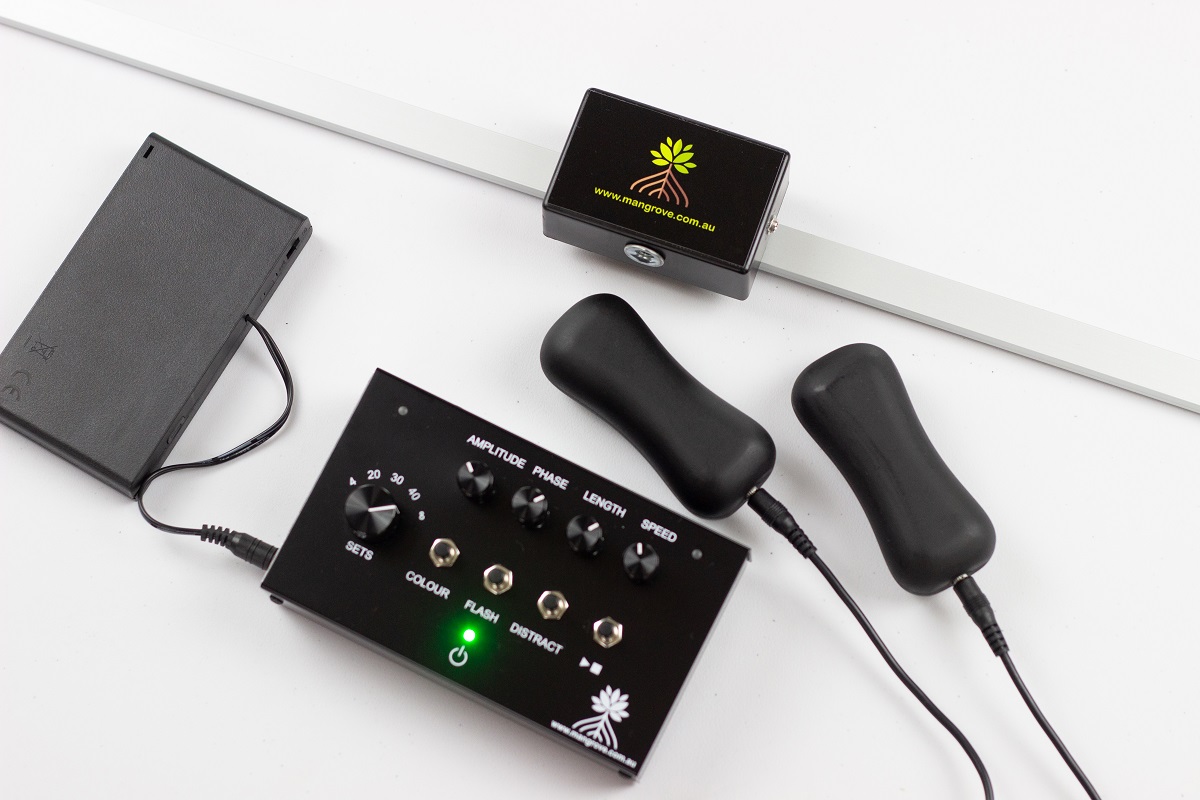
For Mangroveโ€™s Simple EMDR Set, the core arrangement includes a master controller, lightbar, two wired tappers and optional stereo headphone output. Because the components connect physically, an inventory and connection check are particularly helpful when the set is transported or shared.

A practical group-practice checklist

  1. Identify which appropriately trained clinicians may use the system.
  2. Nominate responsibility for inventory, faults and manufacturer contact.
  3. Store components together in labelled locations.
  4. Use a consistent physical setup and connection sequence.
  5. Reset adjustable outputs before handover.
  6. Follow a written, material-compatible cleaning process.
  7. Remove faulty or unpredictable components from circulation.
  8. Keep the technical fault log free of identifiable client details.
  9. Treat previous settings as information, not a standing prescription.
  10. Allow booking time for setup, cleaning and return.

Shared tools need clear ownership

Group practices do not need a complicated equipment-management system. They do need clarity. When the physical setup, cleaning responsibilities and fault process are predictable, each practitioner can give more attention to the client and the clinical work.

Share the equipment. Standardise its care. Keep treatment decisions individual.


This article provides general educational information for appropriately trained practitioners. It is not a treatment protocol, infection-control procedure or substitute for professional training, manufacturer instructions, organisational policy, supervision or clinical judgement.

Sources

When Left and Right Feel Uneven: Checking Tappers and Stereo Audio

Alternating bilateral stimulation should be clearly distinguishable from side to side. If one tapper feels weaker, one headphone channel seems quieter or the timing appears uneven, the safest response is not to compensate immediately by increasing intensity. Stop and check what is happening.

An apparent leftโ€“right difference can come from the equipment, a connection, headphone orientation, how a component is being held or fitted, or the clientโ€™s sensory experience. A brief, neutral check can help identify the practical issue without turning the equipment into a diagnostic tool.

Start by stopping the set

Pause bilateral stimulation before touching plugs, moving headphones or changing controls. Ask the client to describe the difference in concrete terms:

  • Does one side feel or sound weaker?
  • Is one side absent entirely?
  • Does the difference happen every time or only occasionally?
  • Is the concern about strength, clarity, timing or comfort?
  • Did it begin after the client changed grip or headphone position?

Avoid suggesting that asymmetry has a psychological meaning. The immediate task is to determine whether the stimulation is functioning as intended and remains acceptable to the client.

Check the basic connections

The Mangrove Inspired Simple EMDR Set connects two wired tappers to separate sockets on the master controller and provides a stereo headphone output for auditory stimulation. Before testing again:

  • confirm that each tapper cable is fully seated at both ends;
  • check that the lightbar and audio accessories are connected to their labelled sockets;
  • look for obvious cable damage, sharp bends or connector strain;
  • make sure the headphone plug is fully inserted; and
  • confirm that an inline volume control, if used, has not been moved accidentally.

Do not connect or disconnect components while a set is running. If a plug or cable appears damaged, remove it from clinical use and seek product support rather than trying to hold it in a working position.

Checking the tappers

On the Mangrove system, the tapper LEDs indicate which side is active and change brightness with the amplitude setting. These indicators help confirm that the controller is sending an alternating signal, although they do not measure how the client experiences the pulse.

A simple check can proceed as follows:

  1. Set a conservative amplitude.
  2. Hold both tappers yourself and run a brief neutral set.
  3. Confirm that the LEDs and tactile pulses alternate.
  4. Check whether either connection cuts in and out when the cables rest naturally.
  5. Ask the client to hold the tappers in their usual position.
  6. If appropriate, swap the tappers between hands and repeat briefly.

If the reported difference consistently follows one tapper, cable or socket, stop using the affected component and contact the supplier. If the difference remains on the same side of the client after the tappers are swapped, that observation may be clinically relevant, but it is not a diagnosis and should not be interpreted by the equipment alone.

Grip and contact can change the experience

Tappers may feel different when one is gripped tightly, held against a different part of the hand or partially cushioned by clothing or another object. Ask the client to hold both in a comparable, comfortable way without requiring a forceful grip.

Do not increase amplitude on both sides simply to overcome an uncertain difference. First establish that the components are working consistently and that the clientโ€™s grip and contact are comparable.

Checking stereo audio

Auditory bilateral stimulation depends on separate left and right stereo channels. If one side is quieter or missing:

  • stop the set and lower the volume before repositioning the headphones;
  • confirm that left and right earpieces are worn on the labelled sides;
  • check that the stereo plug is fully inserted;
  • make sure the headphones sit similarly over or in both ears;
  • test each alternating channel at a conservative level; and
  • if available, compare with another known-working stereo headset.

Do not solve a quieter side by raising the overall volume to an uncomfortable level. Mangrove recommends headphones or an accessory with volume control because its stereo output is strong. Hearing differences, tinnitus or sound sensitivity may also influence the clientโ€™s experience and require appropriate clinical judgement or referral.

Check whether phase is creating a timing difference

When visual, tactile and auditory modalities are used together, the phase control changes the timing of the tapper and audio signals relative to the lightbar. This can make the modalities feel deliberately offset even when each component is functioning correctly.

If the concern is that the light, sound and taps do not appear simultaneous, check the phase position before treating the experience as a fault. Phase changes timing relationships; it should not be used to correct a genuinely weak or missing channel.

When to remove equipment from use

Set a component aside and contact support when:

  • one side does not activate consistently;
  • the signal cuts in and out;
  • a plug, cable or housing is visibly damaged;
  • the problem follows the same component after a careful retest; or
  • the system behaves unpredictably after correct setup.

Clinical sessions are not the place for improvised electrical repairs. Use another verified modality or postpone equipment-assisted stimulation if necessary.

Document the clinical significance, not the repair log

If an uneven signal affected the session, document what the client reported, the clinically meaningful response and what was used instead. Detailed warranty or troubleshooting information can be kept separately from the clinical record.

The practical takeaway

An uneven leftโ€“right experience does not automatically mean that the equipment has failed, and it should not be given an automatic clinical interpretation. Stop, clarify the difference, check the physical setup and retest briefly at a conservative level. If the problem follows a component, remove it from use. If it follows the clientโ€™s side, respond with appropriate clinical judgement rather than trying to โ€œbalanceโ€ it by force.


This article is intended for trained practitioners and provides general information only. It does not replace product instructions, accredited EMDR training, supervision, medical or audiological assessment, or individual clinical judgement.

Sources

What Does Lightbar Travel Length Mean in EMDR Equipment?

A practical explanation of lightbar travel length, how it differs from speed and why the visual path should be adjusted without treating it as a clinical dose.

What Does Lightbar Travel Length Mean in EMDR Equipment?

What Does Lightbar Travel Length Mean in EMDR Equipment?

Lightbar โ€œlengthโ€ refers to the total distance travelled by the illuminated dot from side to side. It does not describe the physical length of the lightbar, the duration of a set or the speed of movement.

That distinction is useful because travel length changes the visual path the client follows. It is an equipment adjustmentโ€”not a clinical doseโ€”and there is no single travel length that is automatically right for every person, room or stage of treatment.

What the length control changes

On the Mangrove Simple EMDR controller, the length knob changes the dotโ€™s total horizontal travel and keeps that travel centred on the lightbar. At its maximum setting, the path extends to 66 centimetres.

A shorter setting creates a narrower left-to-right path around the centre of the bar. A longer setting uses more of the available visual width. The physical lightbar stays in the same position; only the distance travelled by the light changes.

Length and speed are differentโ€”but they interact

Speed describes how quickly the moving dot travels. Length describes how far it travels. Although these controls perform different functions, they interact on the Mangrove system: shortening the travel path can increase the apparent movement rate if the speed control is left unchanged.

For that reason, Mangroveโ€™s operating guidance recommends setting amplitude and travel length before making the final speed adjustment. If length is changed later, recheck the resulting pace rather than assuming the previous speed setting still produces the same experience.

Position the lightbar before choosing the path

Travel length is easier to assess after the lightbar has been positioned for the client. A path that seems modest when the bar is further away may feel much wider when it is closer. Chair position, viewing distance, lightbar height and angle all influence how readily the client can follow the dot.

Set up the tripod or mount securely, seat the client in their usual position and check that the centre of the lightbar is easy to view without an awkward head or neck position. The client should not need to turn their whole head simply because the selected path exceeds what is comfortable for them to track.

Use a neutral demonstration

Before relying on a visual setting during clinical work, demonstrate it without suggesting what the client should experience. Begin with a clearly visible, moderate path and pace, then invite specific feedback:

  • Can the dot be followed without straining?
  • Does the path feel too wide or too narrow?
  • Is the pace easy to perceive?
  • Is the lightbar positioned at a comfortable height and distance?
  • Would another modality be more suitable if visual tracking is uncomfortable or impractical?

The purpose of this check is equipment familiarisation and comfort. It is not a substitute for EMDR preparation, case conceptualisation or trained clinical assessment.

Adjust one variable at a time

If the visual experience needs refining, changing one control at a time makes the result easier to interpret. For example, adjust travel length while leaving colour and brightness-related settings unchanged, then recheck speed because the movement rate may have shifted.

Making several changes together can make it unclear whether the client is responding to path width, pace, colour, room lighting or the lightbarโ€™s position. Small, deliberate adjustments help keep the conversation precise and the technology in the background.

Do not confuse a wider path with โ€œmoreโ€ EMDR

A longer visual path is not automatically more therapeutic, and a shorter path is not automatically gentler or less effective. EMDR is a structured psychotherapy, not an equipment setting. The type and length of bilateral stimulation sets vary between clients, and the clinician chooses how to proceed based on training, observation and the clientโ€™s report.

The lightbarโ€™s length control exists to make the visual path adjustable. It should not be used to imply a guaranteed clinical effect or a universal formula.

Recheck when the room changes

If the lightbar, tripod or chairs have been moved, do not assume the previous setting will look the same. Recheck viewing distance, centring and travel length from the clientโ€™s position. The same applies when equipment is transported between consulting rooms.

A brief visual check before the session can confirm that the dot remains centred, travels smoothly and stops when expected. If the client reports visual discomfort or cannot follow the path comfortably, pause and reassess rather than asking them to persist.

A flexible path, guided by the practitioner

An adjustable lightbar allows the visual path to suit different room layouts and client presentations. Its value lies in practical flexibility: the clinician can select a clear, observable path and refine it without moving the entire device.

As with every equipment control, travel length supports delivery. Accredited training, client feedback and professional judgement determine whether and how visual bilateral stimulation is used.

Explore the Mangrove Simple EMDR Set, including its adjustable RGB lightbar, tactile tappers and optional stereo audio.

References

Choosing an EMDR Lightbar Colour Without Overcomplicating It

An RGB lightbar can offer several colour choices, but the colour control should be understood for what it is: a way to change the appearance and visibility of the moving light. It is not a selector for different therapeutic effects.

On the Mangrove Simple EMDR system, the clinician can choose from ten lightbar colours. That flexibility can help the moving dot remain easy to see in different rooms and can accommodate straightforward client preferences. It should not be used to promise that a particular colour is calming, activating or clinically superior.

Colour changes visibilityโ€”not the EMDR protocol

The lightbar still provides a moving visual stimulus regardless of which available colour is selected. Speed controls how quickly the dot moves, while travel length controls how far it moves from side to side. Colour changes its visual presentation.

This means a colour change does not alter the number of sets, the tactile amplitude, the audio signal or the phase relationship between modalities. Keeping those controls conceptually separate helps practitioners adjust the system deliberately.

Start with the actual room

A colour that is clearly visible in one consulting room may appear less distinct in another. Ambient lighting, daylight, wall colours, reflections, viewing distance and the lightbarโ€™s angle can all influence what the client sees.

Position the lightbar first, then view it from the clientโ€™s chair. Check whether the moving dot is distinct across the full selected path without requiring the client to strain or search for it. If the room changesโ€”or the equipment is transportedโ€”recheck the colour rather than assuming the previous choice will look identical.

Offer a small, neutral choice

Ten options do not need to become a lengthy decision. A practical demonstration might compare two or three clearly visible colours and ask a neutral question such as, โ€œWhich is easiest for you to follow?โ€

Avoid suggesting that the client should find blue relaxing, red energising or another colour emotionally meaningful. Those expectations can shape feedback and turn a simple visibility check into an unintended interpretation exercise.

If the client has no preference and can follow the dot comfortably, there may be no reason to continue cycling through colours. The goal is a workable setting, not finding a supposedly perfect one.

Preference is useful information, not proof of effect

Client preference can help make equipment feel less intrusive and may identify a colour that is easier to perceive. It does not establish that the selected colour changes treatment efficacy.

Research and professional guidance recognise that EMDR may use visual, tactile or auditory bilateral stimulation and that modality choices can be shaped by individual needs and preferences. That supports thoughtful choice without justifying unsupported claims about the therapeutic properties of individual colours.

Change one variable at a time

When checking a colour, keep speed, travel length and lightbar position stable. This makes it easier to tell whether the colour itself improves visibility.

If the dot remains difficult to follow, do not assume colour is the only issue. Consider:

  • room lighting or glare;
  • the distance and angle of the lightbar;
  • the selected travel length;
  • the movement speed;
  • whether visual stimulation is suitable and comfortable for this client;
  • whether a tactile or auditory option would be more appropriate within the clinicianโ€™s training.

A clear equipment demonstration can help separate these practical factors.

Pause if visual tracking is uncomfortable

A client should not be encouraged to persist with a colour or visual modality that is difficult or uncomfortable to follow. Stop, check what they are experiencing and reassess the equipment or modality in accordance with accredited EMDR training and clinical judgement.

Colour selection does not replace screening, preparation or observation. Nor does it make visual stimulation suitable for everyone.

Keep colour changes purposeful

Changing colours repeatedly during processing can draw attention to the equipment itself. Unless a change has a clear practical reason, a stable, visible setting may be less distracting.

If an adjustment is needed, make it deliberately and check the clientโ€™s response. The technology should support the clinicianโ€™s work rather than become the focus of the session.

A visual optionโ€”not a clinical claim

The Mangrove lightbarโ€™s colour control provides useful flexibility for different rooms and individual visual preferences. Its value lies in helping the moving dot remain clear and acceptable to the client.

No colour should be marketed or selected as a guaranteed route to a particular emotional or therapeutic outcome. The equipment presents the stimulus; the trained clinician guides the therapy.

Explore the Mangrove Simple EMDR Set, including its adjustable RGB lightbar, tactile tappers and optional stereo audio.

References

Choosing EMDR Equipment in Australia and New Zealand: A Practical Checklist

Seven practical questions for comparing EMDR equipment, from modalities and control quality to room fit, warranty, local support and long-term cost.

Choosing EMDR Equipment in Australia and New Zealand: A Practical Checklist

Inspiration

Whatโ€™s a personal mantra or philosophy you live by?

Find you "usefulness"

Scroll to Top